
A private access point just for you
Configure your connection through your own server and dedicated IP address instead of a shared VPN account.
The IP allocation is verified along with the scope of the service.Set up your private VPN located in Turkey with one click. Connect to your servers and business applications for 2 people at the same time without paying additional connection license fees.
 Kocaeli
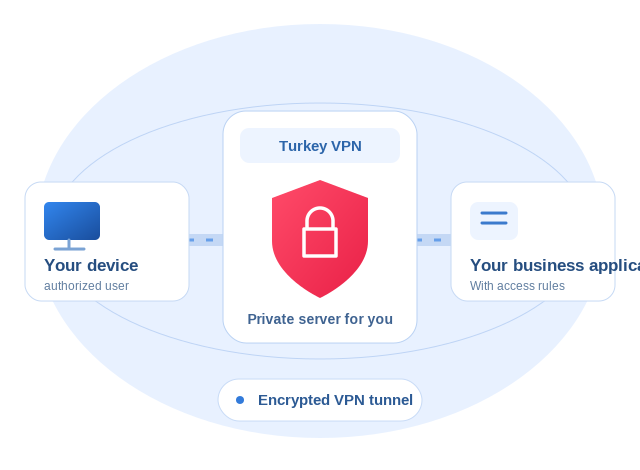
Plan who will connect to which system and via which route. Use VPN as a layer of your access architecture.
Configure your connection through your own server and dedicated IP address instead of a shared VPN account.
The IP allocation is verified along with the scope of the service.RDP Plan to restrict access to SSH and admin panels via VPN network or allowed IP.
The target server's firewall and network settings must also be configured.With the proper configuration, pass traffic between your device and the VPN server through an encrypted tunnel.
VPN; HTTPS is not a substitute for updates and end device security.Choose your Turkey VPN package. Get started with one-click installation and no additional license fees for 2 simultaneous connections.
Let's move your server to a private local network; Access to the server from outside should only be via VPN. Use RDP, databases and on-premises applications on your private network instead of public access.
Get a quote for a private local network →Private local area network is an additional service purchased separately. The server's internet output and access rules are also configured according to your needs.Consider using an RDP connection to your Windows server behind a VPN with appropriate access rules.
Explore desktop VDS packages →Include test servers, databases, and internal services in the network design so that only authorized users can access them.
See cloud server options →Narrow your access policy by adding the dedicated VPN IP address to the permission list in supporting corporate services.
Let me share my network requirements →Check the period, user/connection requirement and service scope on the official order screen.
After order confirmation, start the VPN installation with a single click from your panel. Get your connection profile and add it to your device.
Import the connection profile provided to you to the supported client. Store your profile and identity information safely.
Check the routing and permissions of target systems. Verify that only authorized services are accessible.
Evaluate the section protected by the VPN connection and the connection after the VPN separately.
Turkey VPN serverAuthentication and routingSplit tunnel certain networks; Full tunnel also carries internet traffic through VPN according to the routing setting. After VPN, HTTPS and the firewall of the target system remain important. Test the services that are accessible.
Let me discuss my connection plan →List who will connect to which RDP, SSH or company applications. Determine separate authorization and exclusion processes for each user.
Accessing only the business network and passing all internet traffic through the tunnel are different routing schemes. Determine the scope that suits your needs; Besides VPN, also manage the firewall and updates of target systems.
Let's plan my project togetherVPN can be used to establish encrypted access between the client and the designated network. It can be considered for enterprise remote access and controlled connection to specific network resources.
Using a VPN is not a guarantee of anonymity or protection against all threats. Authentication, client security and logging policy should be planned separately.
VPN does not provide absolute anonymity or protection against all attacks. Encryption is between the two ends of the tunnel; Use HTTPS for connections outside the tunnel. Implement strong authentication, updates, and access restrictions together.
Whether all traffic or specific networks will pass through the tunnel depends on the configuration. Verify record retention and privacy coverage from the provider's applicable policies.
VPN can be used to establish encrypted access between the client and the designated network. It can be considered for enterprise remote access and controlled connection to specific network resources.
Check out the current options from the packages on this page. Compare the term, renewal and additional service fees, if any, in your cart; The final total is verified at the time of order.
Specify user and concurrent connection, Authentication, Traffic and logging policy information. Using a VPN is not a guarantee of anonymity or protection against all threats. Authentication, client security and logging policy should be planned separately.
In the private VPN solution, you can plan your own connection structure over the server and IP allocated to you. In shared services, the server and exit IP can be shared with other customers. The product and contract determine the actual scope.
Only the Turkey VPN product specified as TR in the İsim Kayıt catalog is displayed. VPN packages for Europe or any other country are not offered through vds.tr.
Traffic passing through the tunnel between your device and the VPN server is protected. Whether all traffic or only certain networks pass through the tunnel depends on the routing configuration. Continue to use protections such as HTTPS for post-tunnel connections.
No. Log-in accounts, cookies, device information and service records may be associated with your identity. VPN does not provide absolute anonymity; Also review the privacy and registration policies.
With proper network routing and firewall rules, RDP access can be scheduled over VPN. Simply purchasing a VPN does not automatically change the access rules of the target Windows server.
2 people can connect to VPN at the same time; There are no additional license fees for these two simultaneous connections. VPN server package is paid. If you need more simultaneous connections, you can request a quote for licenses and capacity.
Dedicated egress IP can make it easier to create IP permission lists in supporting services. This method alone is not a substitute for user authentication or access authorization.
There is no guarantee of speed increase. Conclusion; It depends on your device, internet connection, network route, encryption load and server capacity. Evaluate your needs with real connection tests.
After order and payment confirmation, you can start the VPN installation with a single click from your panel. Follow the transaction status on the panel to complete the installation and prepare your connection profile.
This page shows the product and period price in the live catalogue. Verify taxes, traffic, number of users, software license, management and support scope from the official order screen and contract.
Yes. With the private local network service, which can be purchased separately, we can configure your server to turn off direct internet access and provide the connection only through VPN. The server's internet output, routing and firewall rules are determined according to your needs.
Private local network is an additional service that is charged separately. You can get an offer by sharing your server number and access needs. There is no additional connection license fee for 2 simultaneous connections in the VPN package.
Have questions about source, migration or package selection? Evaluate your project with our sales team.